Shortcuts make life easy. When it comes to using computers they can save you those precious extra seconds and make your work flow, allowing you to complete tasks faster.
We’re all familiar with the CTRL + Z aren’t we? You’ve deleted that whole paragraph accidentally or that whole directory and panicked. Then there’s the good old Copy (CTRL + C) and Paste (CTRL + V) shortcuts. What they all do is save you that extra time lifting your hand up and using your mouse. Mastering them can mean a saving in time that adds up and just make doing your work more efficiently.
In MEX we call these shortcut combinations Hot Keys.
Hot Keys allow a user to save open a module with a key combination rather than using those extra seconds by using your mouse.
To see the available shortcut keys in MEX press CTRL + ALT
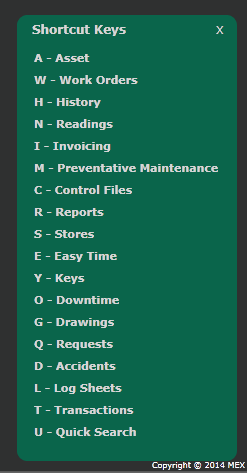
Available Hot Keys Listing in MEX
You can then use CTRL + MEX Hot Key Letter to open the respective module
Examples are
- CTRL + A – open Asset Register
- CTRL + W – open Work Order Listing
- CTRL + R – open MEX reporting
Have a play with the MEX Hot Keys and see how they can help you