Often in your business you will come across cases where you need to temporarily stop use of an asset or a group of assets. In accordance with this, you probably don’t want to keep generating routine maintenance jobs for something you aren’t even using. In this case, you would turn off (de-activate) any Preventative Maintenance plans and then switch them back on later once you start using the asset/s again.
But what if you forget?
If you know approximately when you’ll be needing this asset again, you can specify when you want the PM to automatically re-activate itself.
How to Turn Off a Preventative Maintenance Schedule
Go to the Preventative Maintenance listing and open up the PM you wish to temporarily switch off and then click on the ‘Active?’ checkbox in the top right corner.
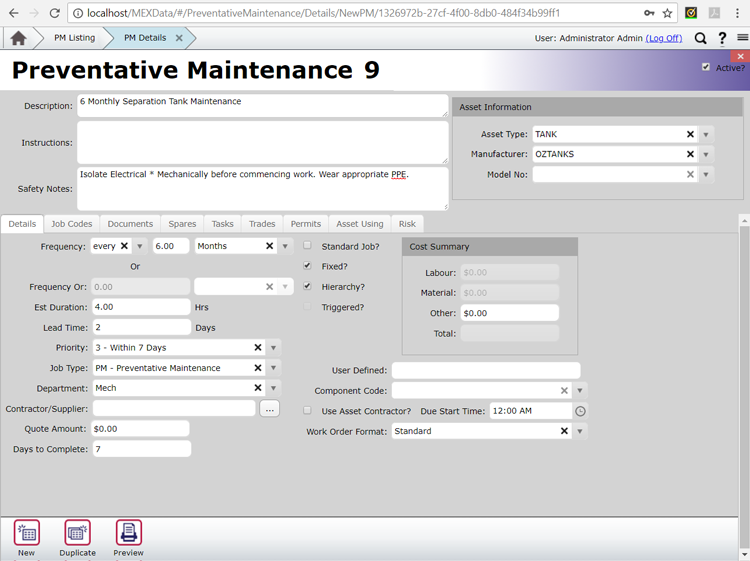
Active check-box is highlighted on a Preventative Maintenance Schedules details.
Once you’ve clicked on this, it should change to a date picker. Select the date you want the PM to re-activate on and then MEX will do the rest.
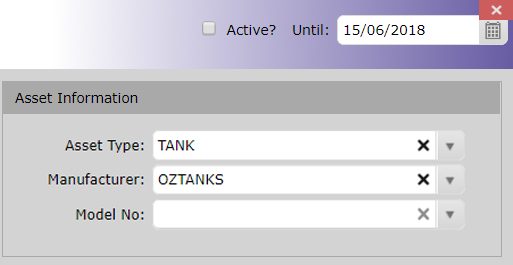
Date picker to set re-activation date
If you find that you don’t have this feature in MEX, it might be time to upgrade to the latest version and stop missing out on the latest features.
For more information or help with this, contact the MEX Maintenance Software Support team at support@mex.com.au or call +61 7 3392 4777